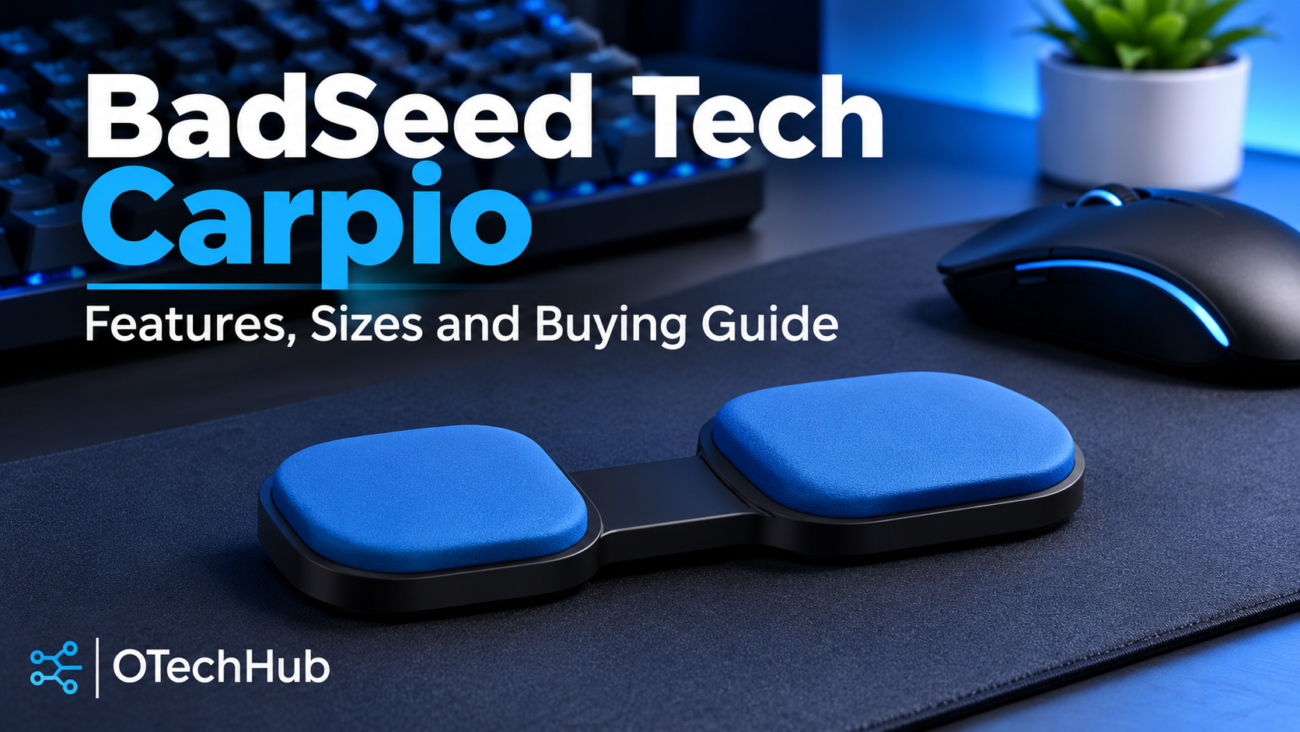
BadSeed Tech Carpio is a creator edition of DeltaHub’s Carpio 2.0, a small gliding support that sits under your palm and moves with your mouse hand. It is not a mouse, keyboard or any kind of electronic device. It has no software, battery or cable. People search for the name because it sounds like a new gadget, when it is really a familiar ergonomic accessory in a collaboration colourway.
This guide explains what the edition includes, how the gliding design works, what the materials do and how it differs from the standard model. It also covers sizing, compatibility and who should think twice before buying. It is an independent explainer based on manufacturer documentation, not a hands-on review. The writer has not tested the product.
What Is BadSeed Tech Carpio?
DeltaHub lists the product as Carpio 2.0 – BadSeed Tech Edition, a limited creator collaboration. It is a black Carpio 2.0 paired with exclusive BadSeed Tech replacement pads, in a colour option DeltaHub calls “BadSeed Tech Blue”.
The Carpio 2.0 is a gliding ergonomic mouse wrist rest. It is a compact palm support with low-friction feet underneath, designed to slide across the desk as you move the mouse. Per the DeltaHub listing, the product is made by DeltaHub d.o.o. in Celje, Slovenia, and sold by DELTAHUB Inc. in New York.
Understanding the BadSeed Tech and DeltaHub Collaboration
BadSeed Tech is a tech video creator. The creator’s link hub describes the channel as “tech videos, all killer, no filler” and points to YouTube, Instagram and TikTok. You can find those links through BadSeed Tech’s official channels.
On the product page, the creator (Brian) says he first dismissed the Carpio as a desk accessory. He then tried it after developing repetitive strain issues. That is a personal account published on a sales page. It shows why the collaboration exists, but it is not evidence that the product works.
The collaboration changes the look of the product, not the mechanism. You get the black Carpio 2.0 with its standard pads, plus a set of BadSeed Tech replacement pads you can swap in. DeltaHub’s tagline for the edition, “for dark setups with a sharper performance feel”, is marketing language. Nothing on the listing describes a different mechanism or measurable performance gain.
How the Carpio 2.0 Gliding Design Works
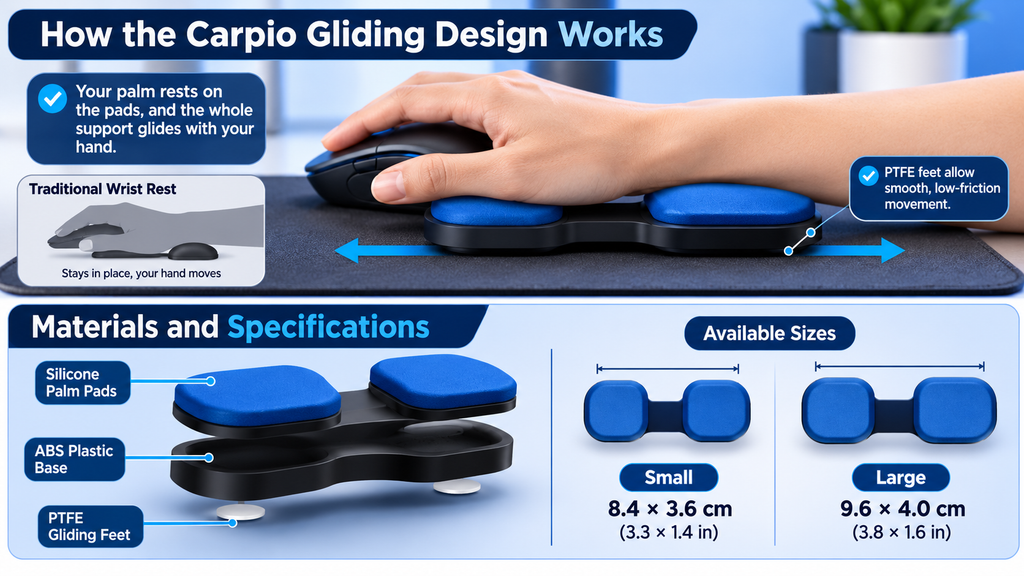
A conventional wrist rest is a stationary cushion. Your hand moves across the desk while the rest stays put, so your wrist ends up dragging or pivoting against it.
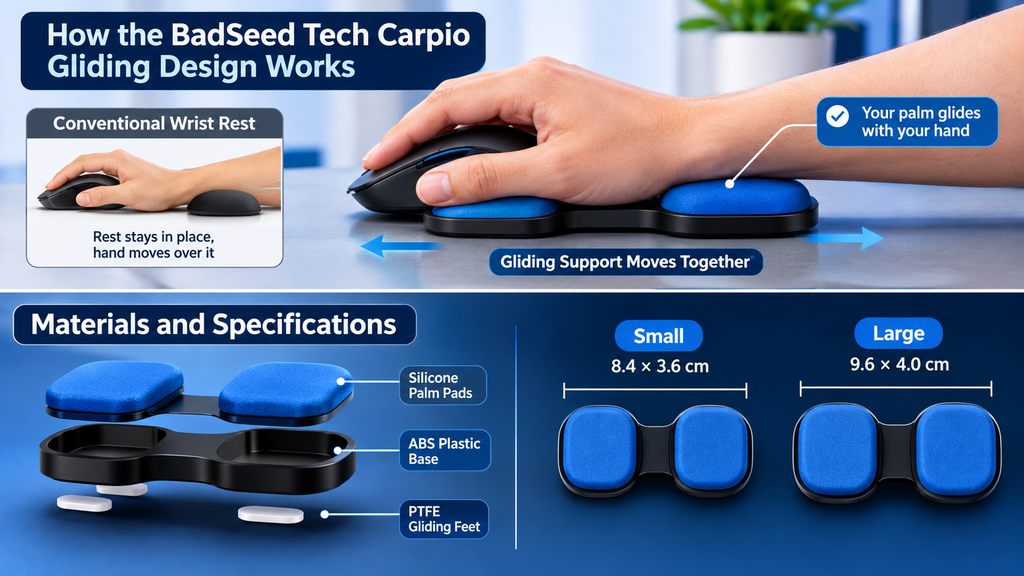
The Carpio does the opposite. Your palm sits on two silicone pads, and PTFE feet underneath let the whole unit slide with your hand. Think of a tiny sled that carries your palm along. DeltaHub’s instructions say to rest your palm firmly on the pads without pressing hard, and to let your hand glide. They also say your elbow should be supported by an armrest or the desk.
DeltaHub says the shape shifts pressure away from the carpal area toward the sturdier parts of the palm, and that the design involved medical experts. Those are the manufacturer’s statements. The listing cites no published clinical studies, and this article does not assess any clinical evidence. The Carpio is an ergonomic computer accessory, not a medical treatment. It is not presented here as a way to prevent, treat or cure carpal tunnel syndrome or any other condition.
Materials and Build Quality
DeltaHub lists three materials for the Carpio 2.0.
- PTFE gliding feet: PTFE (often sold under the Teflon name) is a well-known low-friction plastic. It lets the unit slide with little resistance, so the support can follow your hand instead of staying put.
- ABS plastic base: ABS is a rigid, widely used thermoplastic. It gives the unit a firm structure for the feet and pads to attach to.
- Silicone palm pads: Silicone provides a soft contact surface for your palm. In this edition, the pads are what carry the BadSeed Tech styling, and they are replaceable.
DeltaHub’s general product documentation recommends cleaning with a damp cloth at least monthly, and avoiding abrasive non-polar cleansers and alcohol-based agents. This article makes no claims about long-term durability, because none can be verified from the listing.
BadSeed Tech Carpio Specifications
The table below covers the collaboration listing only. Pricing reflects what the page displayed on 9 November 2026 and can change.
| Specification | Information (DeltaHub listing) |
|---|---|
| Product | Carpio 2.0 – BadSeed Tech Edition |
| Product type | Gliding ergonomic mouse wrist support |
| Base colour | Black |
| Palm pads | Exclusive BadSeed Tech replacement pads (“BadSeed Tech Blue” option) |
| Gliding feet | PTFE |
| Base material | ABS |
| Pad material | Silicone |
| Large size | 9.6 × 4.0 cm (3.8 × 1.6 in) |
| Small size | 8.4 × 3.6 cm (3.3 × 1.4 in) |
| Hand options | Left, right or both (the “Both” option shows a 15% saving) |
| Included | Black Carpio 2.0 with standard pads in your chosen size, plus BadSeed Tech replacement pads |
| Displayed price | $59.80 sale / $69.80 regular (USD, default Large “Both” configuration) |
| Returns and warranty | 60-day returns; 2-year limited warranty on defects (per DeltaHub) |
A note on conflicting dimensions. DeltaHub’s general “Carpio Product Information” page lists different figures: Size S at 8.5 × 3.8 × 1.5 cm and Size L at 9.5 × 4.5 × 1.7 cm, plus weights of 17 g and 22 g. The page doesn’t explain the gap. For this edition, use the collaboration listing’s measurements, and treat the general page as a reference for the wider Carpio line. The general page also lists a protective case and sticker, but the collaboration listing does not mention either, so don’t assume they come in the box.
Prices vary by size and hand option, and the same product also appears on DeltaHub’s collection page with a “from $34.90” price. Check the live listing for your configuration and country.
Small vs Large: Which Size Should You Choose?
The collaboration listing offers Large (9.6 × 4.0 cm) and Small (8.4 × 3.6 cm). The 1.2 cm gap in length is small on paper, but it affects how your palm sits on the pads.
DeltaHub’s guidance is to use its size guide, which includes a credit-card test. If you are still undecided, it suggests a smaller size for tasks needing precise movements and a larger one for general-purpose support. Customer comments on the listing include one person returning a pair for being too small, but anecdotes like that aren’t a reliable sizing method.
Don’t guess from your height or a friend’s setup. Follow the official guide, and check the 60-day return terms before ordering. DeltaHub says returns are free in the US, EU and UK and paid by the customer elsewhere, unless the item is faulty or wrong.
Desk Surface, Keyboard and Mouse Compatibility
Compatibility is where most buyers go wrong, because the Carpio depends on both the surface and the heights around it.
Desk surface. DeltaHub says the Carpio glides about as smoothly as a PTFE-footed mouse, so if your mouse glides on a surface, the Carpio should too. It names neoprene or felt desk mats as the best surfaces. Smooth desks can work, but a textured, sticky or dusty surface will likely undermine the gliding.
Keyboard height. According to DeltaHub’s FAQ, a keyboard with a front edge under 1.5 cm fits well. Above that, the Carpio can end up too low relative to your keys. Many low-profile and standard keyboards qualify. Taller mechanical keyboards often don’t, so measure yours first.
Vertical and ergonomic mice. These sit taller than a conventional mouse, so the Carpio can be too low to support your wrist properly. DeltaHub’s suggested fix is Carpio Mods, an extra level that sits between your desk and the Carpio to raise it. The product page lists these as available, but confirm compatibility with your specific mouse on that listing.
If you are building a desk around accessories like this, OTechHub also covers gaming accessories and other technology products in its guide to shopping for gadgets, including warranty and compatibility checks.
Practical checklist before buying:
- Measure your keyboard’s front-edge height.
- Check whether your mouse is standard, vertical or unusually tall.
- Confirm your desk or mat is smooth enough for gliding.
- Make sure your chair or desk supports your elbow.
BadSeed Tech Edition vs Standard Carpio 2.0
DeltaHub’s listings show these two products share the same core design.
| Area | BadSeed Tech Edition | Standard Carpio 2.0 |
|---|---|---|
| Platform | Carpio 2.0 | Carpio 2.0 |
| Base colour | Black | Black, white or grey (per the Carpio 2.0 Set listing) |
| Pads | Standard pads plus exclusive BadSeed Tech replacement pads | Standard pads; other colours sold separately |
| Appearance | Creator-branded styling, “BadSeed Tech Blue” | Standard colourways |
| Gliding mechanism | PTFE feet | PTFE feet |
| Materials | ABS base, silicone pads | ABS base, silicone pads |
| Sizes | Small and large | Small and large |
| Performance | No difference stated by DeltaHub | Baseline |
No performance difference is documented, so none should be assumed. The edition is mainly about looks and the extra pad set. DeltaHub sells replaceable pads separately (listed at $19.90 on the page we checked), which gives you a rough way to value the extras.
The edition sits among other collaborations, such as the Liv Edition and the LTT Edition. DeltaHub’s 5th Birthday Deals collection also lists it. That page describes a limited promotional window delivered by email, running from July 23 to 30. It doesn’t state a year, and this article could not confirm any currently active discount. Treat the birthday sale as a past campaign unless DeltaHub’s site says otherwise at the time you shop. You can browse the range at DeltaHub’s 5th Birthday Deals collection.
Who Might Find BadSeed Tech Carpio Useful?
Suitability depends on your habits, your hand and your desk. The people who might consider it include:
- Gamers: Mouse-heavy play involves repeated movement, and a gliding support suits people who sweep their whole arm rather than flick the wrist. It will not improve aim by itself.
- Office workers: Long days of spreadsheets and email involve steady small movements, where a compact support may feel more natural than a bulky cushion.
- Programmers: Mixed keyboard-and-mouse work makes keyboard height and desk setup the key checks.
- Designers and editors: Precise, detailed mouse work may favour the smaller size, per DeltaHub’s sizing note.
- Students: A small, portable accessory may suit shared desks and laptop setups.
If you have persistent pain, numbness or weakness in your hand or wrist, talk to a qualified health professional. An accessory is not a substitute for medical advice.
Limitations and Things to Consider Before Buying
- Compact design. The pads are small by design. If you prefer a large, stationary cushion across your whole wrist, this is a different experience.
- Adjustment period. A moving support behaves differently from a fixed one. One customer comment on the listing says getting used to it took a few extra days, but that is one voice, not a rule.
- Compatibility. Tall keyboards and vertical mice may need extra height, and a poor surface undermines the gliding.
- Price. At the displayed $59.80 sale price for the default configuration, the edition costs more than many basic foam or gel rests. Compare it with the standard Carpio 2.0 if styling doesn’t matter to you.
- Size selection. A wrong size means a return, even though DeltaHub offers 60 days.
- Personal preference. Comfort is subjective. Marketing claims and testimonials, including those on the product page, are not independent evidence.
Where to Find Official Product Information
For current pricing, stock, size guide, hand options and policies, go to the manufacturer. DeltaHub’s listing for the Carpio 2.0 BadSeed Tech Edition is the primary source for this edition. Prices and availability can differ by country, so check the listing for your region before ordering.
Frequently Asked Questions
What is BadSeed Tech Carpio?
It is the BadSeed Tech collaboration edition of DeltaHub’s Carpio 2.0, a gliding ergonomic mouse wrist support. It pairs a black base with exclusive BadSeed Tech replacement pads.
Who makes BadSeed Tech Carpio?
DeltaHub makes it. BadSeed Tech is the creator partner whose styling the edition carries.
Is it different from standard Carpio 2.0?
The platform and listed materials are the same. The edition differs in black-base styling and the extra BadSeed Tech pads. DeltaHub states no performance difference.
How does its gliding design work?
Your palm rests on silicone pads, while PTFE feet underneath let the whole unit slide with your hand across the desk.
What materials are used?
PTFE gliding feet, an ABS base and silicone pads, according to DeltaHub.
What sizes are available?
Small (8.4 × 3.6 cm) and Large (9.6 × 4.0 cm), in left, right or both-hand options on the collaboration listing.
Does it work with mechanical keyboards?
It can, depending on height. DeltaHub says keyboards with a front edge under 1.5 cm fit; taller ones may leave the Carpio too low without an added height solution.
Is it a medical device?
No. It is an ergonomic computer accessory, not a treatment. See a health professional for persistent symptoms.
Final Verdict
The BadSeed Tech Carpio is best understood as a styled version of a proven concept: a small, mechanical, gliding palm support with a black base and extra pads. Its real appeal is the moving-support idea, with the creator branding as a bonus. The listing documents no functional upgrade over the standard Carpio 2.0.
It makes sense if you like the Carpio approach, your keyboard front edge is low enough, your desk surface is smooth and you want the BadSeed Tech look. Buyers who care only about function should compare against the standard edition, measure their setup first and rely on the official size guide.
